Odoo VAT Return XML Export for Cyprus TFA
Our module exports your full Cyprus VAT return from Odoo as an XML file, ready to upload to Tax For All (TFA), the Cyprus Tax Department portal, with no manual entry.
For Odoo 19 and Odoo 20 Enterprise · Monthly and quarterly VAT periods · Requires the Logosnet Cyprus tax report (l10n_cy)
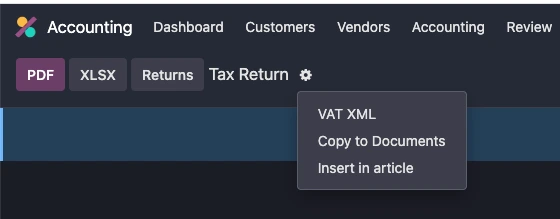
One-click XML export
Easy upload to TFA

How it works
- Post your invoices and bills in Odoo as usual.
- Run the Cyprus VAT report for the month or quarter.
- Export the XML file and save it to your computer.
- Upload it to TFA through the mass upload menu and submit.
Frequently asked questions
How do I submit the Cyprus VAT return from Odoo?
Run the Cyprus VAT report in Odoo for the period, export it as an XML file with the Logosnet module, then upload the file through the mass upload menu in Tax For All (TFA).
Does it support monthly and quarterly VAT returns?
Yes. The module exports both monthly and quarterly VAT periods.
What does the XML file contain?
The whole VAT return, in the format TFA requires, so there is nothing to re-key on the portal.
What do I need installed?
The module needs the Logosnet version of the Cyprus tax report (l10n_cy), adapted to match the TFA VAT return.
Which Odoo versions are supported?
The module works with Odoo 19 and Odoo 20 Enterprise.