Eurobank XML Mass Payments for Odoo
An Odoo module that exports your vendor batch payments as an XML file you can upload straight to Eurobank online banking.
For Odoo 19 and Odoo 20 Enterprise · Supports SEPA credit transfers
Create your vendor payments
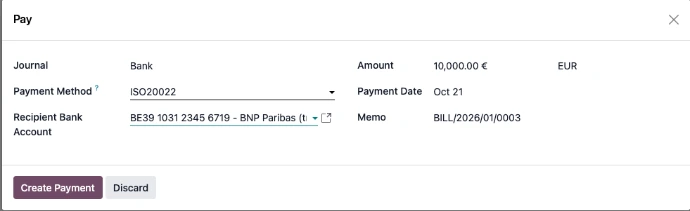
Create vendor payments directly from a bill, or manually.
The bill reference and vendor bank account are filled in automatically from your Odoo records.
Safety: vendor bank accounts must be marked as trusted before they can be used.
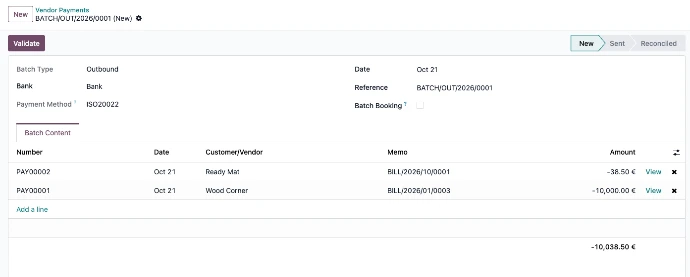
Group vendor payments into batches by bank
The Eurobank XML Mass Payments module exports each batch as an XML file, ready to upload to Eurobank online banking.
- No more manual entries.
- No more transposition errors.
- No more wrong amounts paid to vendors.
Frequently asked questions
Can Odoo export Eurobank mass payments?
Yes. With the Eurobank XML Mass Payments module, Odoo groups your vendor payments into a batch and exports it as an XML file you can upload to Eurobank online banking.
Which Odoo versions are supported?
The module works with Odoo 19 and Odoo 20 Enterprise.
Does it support SEPA payments?
Yes. The module supports SEPA credit transfers.
Can I pay several vendors at once?
Yes. Group as many vendor payments as you need into one batch, export a single XML file and upload it to Eurobank online banking in one go.
What is a trusted bank account in Odoo?
Before a vendor bank account can be used for payments, it must be marked as trusted in Odoo. This stops payments going to bank details that nobody has checked.
How it works
- Create payments from your vendor bills, or manually.
- Group them into a batch for your Eurobank account.
- Export the XML file and upload it to Eurobank online banking.